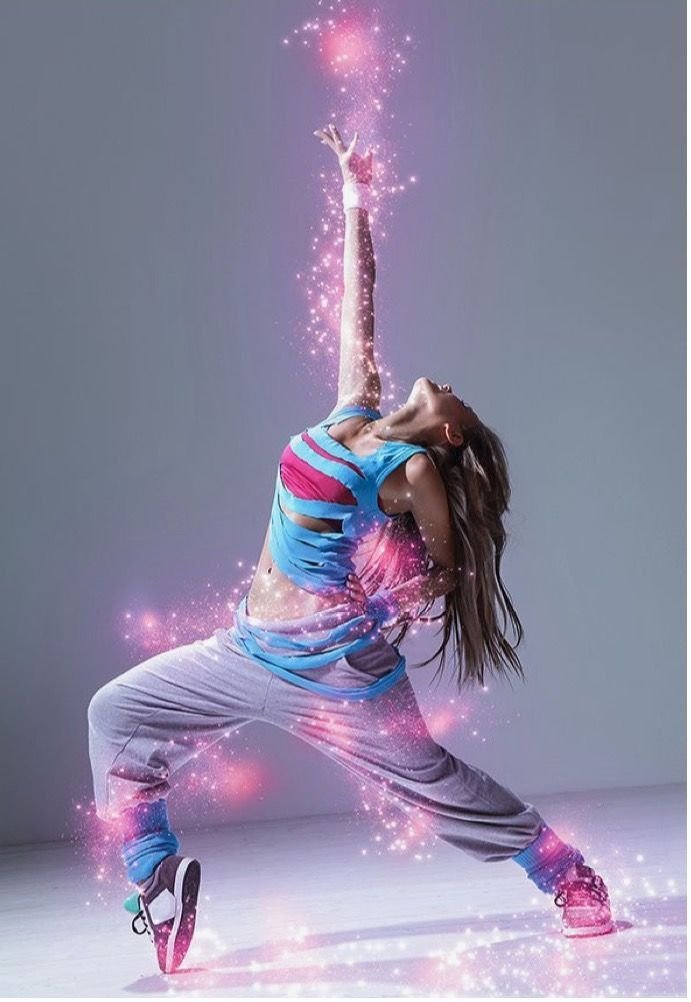
Dynamic dance portrait tab visually powerful lagta hai jab movement ke saath light energy effects combine ho jaye. Is style me subject ke body ke around pink glowing particles aur light trail create kiya gaya hai jo motion aur energy ko visually amplify karta hai.
Yeh guide aapko step-by-step samjhayega:
- Composition breakdown
- Lighting structure
- Sparkle integration method
- Neon color grading logic
- Professional editing workflow
- AI generation prompt
- Negative prompt
- Advanced variations
1. Composition Breakdown
Image vertical orientation me hai. Subject ek strong extended pose me hai jo upward movement create karta hai.
Structural Highlights:
- Clean grey studio background
- Full body visible
- One arm extended upward
- Diagonal leg positioning
- Strong silhouette separation
Neutral background distraction remove karta hai aur glow effect ko highlight karta hai.
2. Lighting Breakdown
Lighting soft aur even hai.
Key Characteristics:
- Studio light setup
- Minimal shadow
- Clean skin highlights
- Controlled contrast
Glow effect ko enhance karne ke liye base image slightly underexposed hona helpful hota hai.
3. Sparkle Effect Integration
Sparkle effect realistic tab lagta hai jab wo natural light source jaisa behave kare.
Professional Method:
- High-resolution sparkle PNG import karo
- Screen blend mode use karo
- Mask body contour ke along
- Add gaussian blur slight
- Duplicate layer for glow intensity
- Add outer glow with pink tone
Particle placement random mat rakho. Motion direction follow kare.
4. Color Grading Strategy
Base Tone:
- Neutral grey background
- Soft skin tone
- Cool shadows
Glow Contrast:
- Pink highlights
- Slight magenta tint
- Controlled saturation
Editing Steps:
- Reduce global saturation slightly
- Add magenta tint to highlights
- Slight teal in shadows
- Increase clarity on subject
- Keep glow areas vibrant
Color balance maintain karna important hai. Over saturation avoid karo.
5. Professional Editing Workflow
Step 1: Base Adjustments
- Exposure balance
- White balance neutral
- Increase contrast slightly
Step 2: Enhance Pose
- Slight sharpening on face
- Define dress folds
- Reduce background texture
Step 3: Add Sparkle Layers
- Place particles along arm and torso
- Adjust blend mode
- Add light spill on skin
Step 4: Glow Enhancement
- Add soft brush light around arm
- Increase highlight luminance
- Add subtle bloom effect
Step 5: Final Polish
- Add subtle grain
- Soft vignette
- Maintain natural skin texture
AI Image Generation Prompt
Main AI Prompt
dynamic dance portrait of a woman in athletic outfit performing expressive pose in studio, one arm reaching upward, glowing pink sparkle particles surrounding body, soft neon light trails, clean grey background, cinematic lighting, high detail, realistic textures, professional dance photography, vertical composition, energetic motion, magenta glow highlightsNegative Prompt
cartoon style, oversaturated neon colors, unrealistic lighting, low resolution, distorted anatomy, messy background, flat shadows, artificial skin smoothingAdvanced Variations
- Change glow color to electric blue
- Add golden spark trails
- Add subtle floor reflection
- Add light smoke haze
- Increase dramatic shadow depth
Why This Style Works
- High energy visual
- Clear focal movement
- Clean background
- Social media friendly
- Strong color pop
Dance and sparkle combination strong engagement generate karta hai especially creative visual platforms par.
Common Mistakes to Avoid
- Too many particles
- Over bright glow
- Hard mask edges
- Color mismatch
- Flat lighting
Subtle layering hi professional result deta hai.
Sparkle effect editing sirf decorative overlay nahi hai. Yeh motion enhancement aur light simulation ka controlled process hai. Jab particle direction aur light spill logically placed hota hai tab hi image premium lagta hai.
Structured workflow follow karo. Lighting ko respect karo. Har effect ka visual purpose hona chahiye.
Consistent clean educational content create karte raho jo professional aur safe presentation maintain kare.
Important Image Usage Note:
All images used in this guide are shown for demonstration and educational purposes only. Some images may be AI-generated or edited samples and do not claim ownership of original photographs.