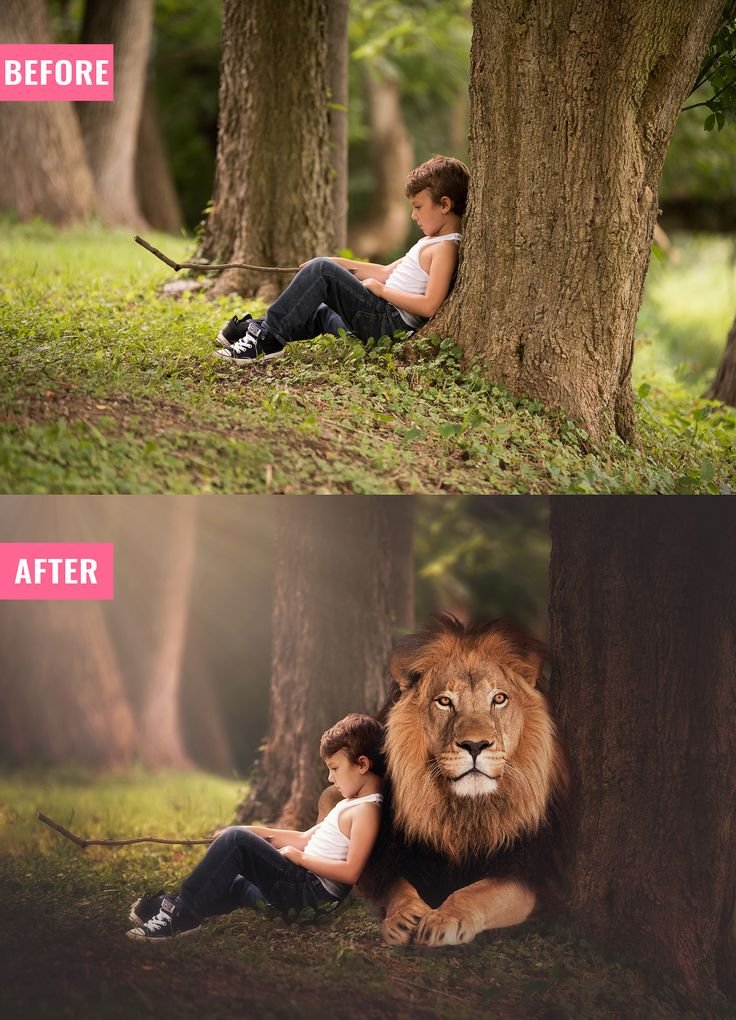
Simple outdoor portrait ko cinematic fantasy scene me convert karna ek structured process hota hai. Is example me ek normal park portrait ko transform karke ek dramatic wildlife-inspired scene create kiya gaya hai jahan child subject ke paas realistic lion composite add kiya gaya hai.
Yeh guide detail me explain karega:
- Before image analysis
- Transformation logic
- Lighting correction
- Lion integration technique
- Color grading method
- Full AI transformation prompt
- Negative prompt
- Advanced variations
1. Before Image Analysis
Original image me:
- Natural daylight
- Soft green grass
- Multiple tree trunks
- Even exposure
- Simple candid pose
Lighting flat aur natural hai. Scene clean hai, jo composite ke liye perfect base provide karta hai.
Important observation: Background already forest-like hai, jo fantasy transformation ke liye suitable environment banata hai.
2. Transformation Strategy
Transformation ka main objective hai:
- Mood darker aur cinematic banana
- Lion realistically add karna
- Light direction consistent rakhna
- Depth enhance karna
Composite tab realistic lagta hai jab har element ka lighting direction same ho.
3. Lighting Enhancement
After version me lighting warmer aur dramatic hai.
Steps:
- Overall exposure slightly reduce karo
- Background darken karo using gradient mask
- Add warm light beam from top left
- Add subtle fog layer for atmosphere
Child subject par light soft aur directional rakhi gayi hai.
4. Lion Integration Technique
Lion ko directly paste karna enough nahi hota. Integration critical hai.
Professional Steps:
- High resolution lion image choose karo
- Perspective match karo
- Shadow manually paint karo
- Add ground contact shadow
- Add warm highlight to match scene light
- Slight blur for depth match
Lion ka color tone background ke saath blend hona chahiye. Oversharp lion unnatural lagta hai.
5. Depth & Atmosphere
After version me:
- Background slightly blurred
- Foreground darker
- Soft haze visible
- Color temperature warm
Yeh depth layering scene ko cinematic banata hai.
6. Color Grading Strategy
Before me bright green tones dominate kar rahe the. After me:
- Greens muted
- Browns warm
- Highlights golden
- Shadows deeper
Editing Formula:
- Reduce green saturation
- Add orange tint in highlights
- Slight teal in shadows
- Increase contrast
- Add vignette
7. Complete Professional Workflow
Step 1: Base Cleanup
- Remove distractions
- Balance exposure
- Adjust white balance
Step 2: Darken Background
- Use gradient mask
- Add vignette
- Reduce clarity
Step 3: Add Lion
- Mask precisely
- Match scale
- Adjust color tone
- Paint shadows
Step 4: Add Atmosphere
- Add light rays
- Add soft fog
- Add subtle dust particles
Step 5: Final Polish
- Global color grading
- Subtle sharpening
- Grain 8–12%
AI Transformation Prompt
Main AI Prompt
cinematic fantasy composite of a young boy sitting under large tree in forest, realistic majestic lion resting beside him, warm golden sunlight filtering through trees, soft fog atmosphere, shallow depth of field, dramatic color grading, muted greens and warm browns, ultra realistic detail, emotional storytelling, professional wildlife fantasy photography, natural shadow integration, vertical compositionNegative Prompt
cartoon lion, unrealistic proportions, oversaturated colors, flat lighting, low resolution, distorted anatomy, bright artificial background, harsh shadows, poor blendingAdvanced Variations
- Replace lion with wolf
- Add light rain atmosphere
- Add glowing fireflies
- Make scene sunset orange
- Add subtle cinematic smoke
Why Before After Edits Perform Well
- Clear transformation impact
- Educational value
- Strong storytelling
- High share potential
- Authority building content
Before-after comparison audience ko process samajhne me help karta hai aur trust build karta hai.
Common Mistakes to Avoid
- Incorrect shadow direction
- Scale mismatch
- Over saturation
- No contact shadow
- Sharp edge masking
Composite realism ka base hai light consistency.
Fantasy photo manipulation structured approach demand karta hai. Har element logically integrate hona chahiye. Lighting, shadow aur color harmony sab aligned hone chahiye.
Random overlays avoid karo. Always analyze base image pehle. Phir transformation build karo step-by-step.
High-quality educational manipulation content consistently publish karte raho. Clean structure aur professional workflow long-term growth aur monetization-friendly platform compliance dono support karta hai.
Important Image Usage Note:
All images used in this guide are shown for demonstration and educational purposes only. Some images may be AI-generated or edited samples and do not claim ownership of original photographs.